Microsoft launches Snapdragon X2 variants of Surface Pro 12 and Surface Laptop 8 with expensive consumer pricing

All the latest news, reviews, and guides for Windows and Xbox diehards.
Become a Member in Seconds
Unlock instant access to exclusive member features.
You are now subscribed
Your newsletter sign-up was successful
Join the club
Get full access to premium articles, exclusive features and a growing list of member rewards.
Last month, Microsoft unveiled the Surface Laptop 8 and Surface Pro 12, powered by Intel Core Ultra series 3 chips and made available exclusively for business customers for a very high price. Today, the company is announcing the Surface Laptop 8 and Surface Pro 12 again, but this time with Snapdragon X2 chips and more consumer-friendly pricing.
While the Snapdragon models are cheaper than the Intel ones, they're still significantly more expensive than the Surface Laptop 7 and Surface Pro 11 were when they first launched in 2024.
The new Surface Laptop 8 with Snapdragon X2 starts at $1,599, and the Surface Pro 12 starts at $1,499. The entry-level SKUs include a Snapdragon X2 Plus with 16GB RAM and 512GB of SSD storage. To compare, the Surface Laptop 7 launched in 2024 with a Snapdragon X Plus with 16GB RAM and 256GB SSD storage for just $999.
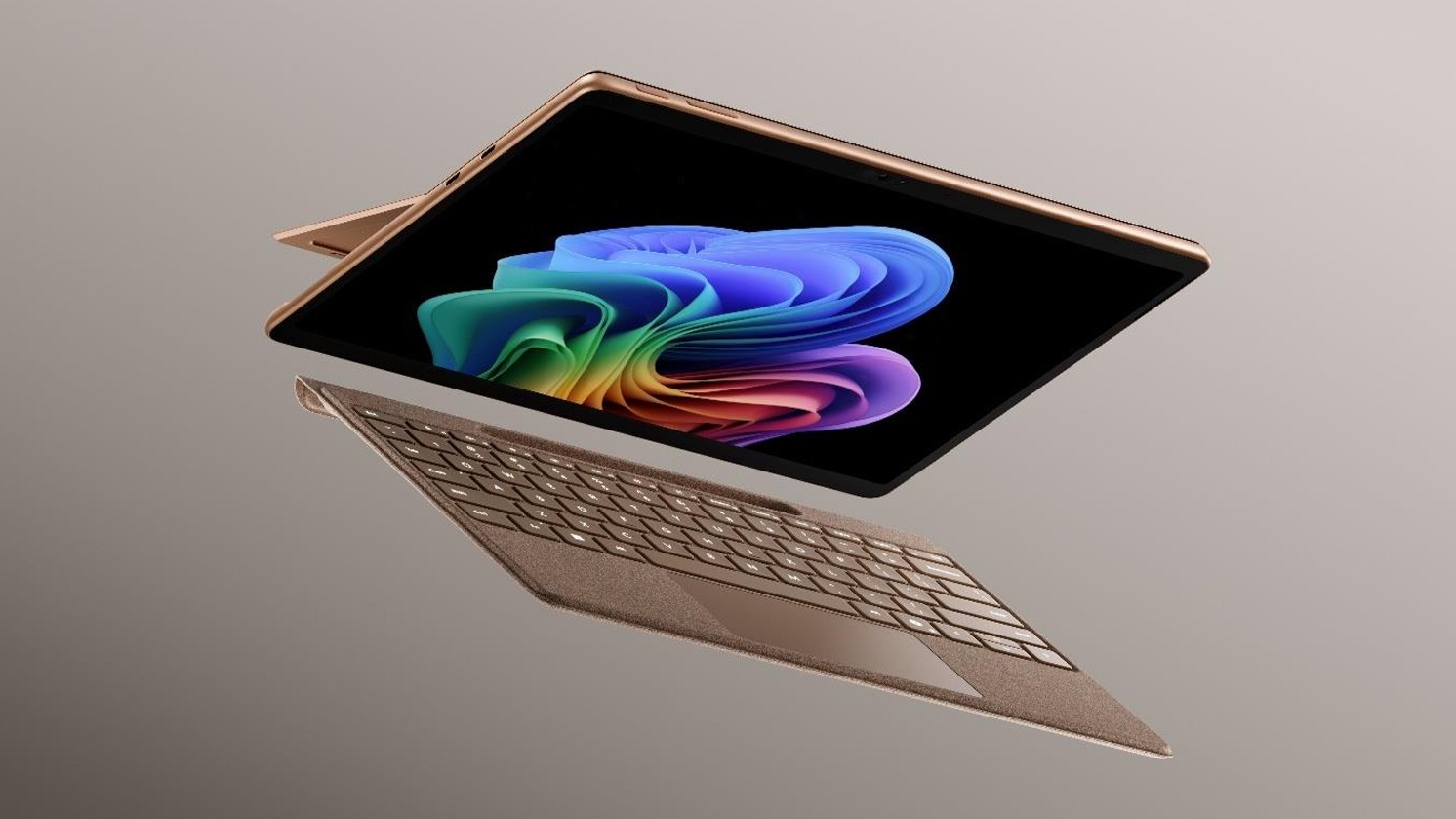
So the new devices are $600 and $500 more expensive respectively, owing to the ongoing component pricing crisis caused by AI. The good news is Microsoft is offering incentives to upgrade to these new models. Between now and June 30, if you buy the new Surface Pro 13, it comes with a Surface Pro keyboard for free! If you order the Surface Laptop, you'll get a free Surface Arc Mouse, and a 50% off offer for Microsoft Complete.
Microsoft is also offering more money for trade-ins currently, so if you have an existing device that you don't need or want to swap for a new model, you can now save up to $900. It's clear the company is hoping that these deals will encourage users to upgrade to the newer models.
So what's actually new outside of the silicon? Well, Microsoft is touting 53% faster graphics performance compared to the last gen models, along with longer battery life on the Surface Pro, now coming in at 15.5 hours, and up to 20 hours on Surface Laptop.
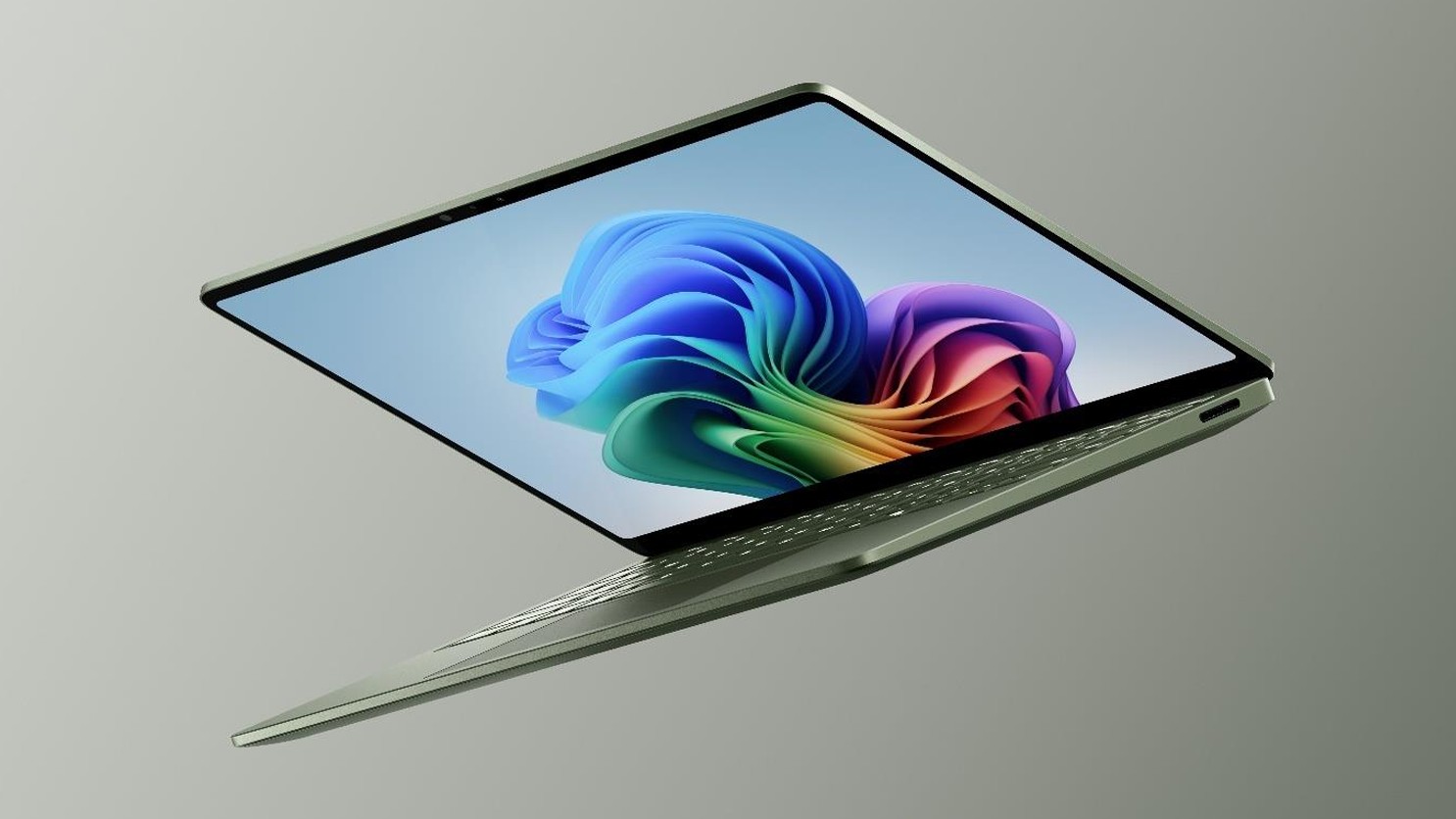
The Surface Pro Flex Keyboard is now available in Dune, and the Surface Laptop 8 itself now comes in a beautiful new Jade green colorway. The Surface Laptop also has a new display on the 15-inch variant with a much higher resolution, coming in at 262PPI. The Laptop also has a new haptic trackpad, which provides subtle feedback when interacting with Windows.
The devices are now also available with more RAM configurations. The last-gen models could only be configured with either 16GB, 32GB, or 64GB RAM. The new devices now have a 24GB RAM option for those who find 16GB too little but 32GB too much, similar to what Apple does with the Mac.
Overall, these are nice quality of life upgrades for the Surface Laptop and Surface Pro. Whether they are worth the higher starting prices will be up to buyers to device. The devices are available to order today for consumers, with business variants of the Snapdragon X2 devices coming on July 14 which will include the same privacy screen features as found on the Intel variants.
Surface Pro 12 and Surface Laptop 8 specifications
If you're interested in the full specification breakdown on these new Surface PCs, we've compiled all the information into handy spec tables that you can view below.
Category
Specification
Processor
Snapdragon® X2 Plus (10 Core)
Snapdragon® X2 Elite (12 Core)
NPU
Qualcomm® Hexagon™ with 80 TOPS
Graphics
Qualcomm® Adreno™ GPU
Memory Options
16GB, 24GB, 32GB or 64GB LPDDR5x RAM
Storage Options
Removable solid-state drive (Gen 4 SSD): 256GB, 512GB, 1TB
OLED Display
Touchscreen: 13-inch PixelSense™ Flow display
Resolution: 2880 x 1920 (267 PPI), 3:2 Aspect ratio
Contrast ratio: 1M:1
Dynamic refresh rate: up to 120Hz
Brightness: SDR 600 nits maximum (typical) / HDR 900 nits peak luminance
Color Profiles: SDR mode (sRGB and Vivid), HDR mode (HDR)
Features: Individually color-calibrated, Adaptive color, Adaptive contrast, Auto color management, 10-point multi-touch, Dolby Vision IQ™ support, Strengthened glass
LCD Display
Touchscreen: 13-inch PixelSense™ Flow display
Resolution: 2880 x 1920 (267 PPI), 3:2 Aspect ratio
Contrast ratio: 1300:1
Dynamic refresh rate: up to 120Hz
Brightness: SDR 600 nits maximum (typical) / HDR 600 nits peak luminance
Color Profiles: SDR mode (sRGB and Vivid), HDR mode (HDR)
Features: Individually color-calibrated, Adaptive color, Adaptive contrast, Auto color management, 10-point multi-touch, Dolby Vision IQ™ support, Strengthened glass
Size and Weight
Length: 11.3 inch (287 mm)
Width: 8.2 inch (209 mm)
Height: 0.37 inch (9.3 mm)
Weight: 1.97 lbs (895 g) (not including Keyboard)
Battery Life
Up to 15.5 hours of local video playback
Up to 11.5 hours of active web usage
Security
Windows 11 Secured-core PC
Microsoft Pluton security processor / TPM 2.0
Windows Hello facial recognition with Enhanced Sign-in Security
Microsoft Defender for enhanced identity and privacy protection
Smart App Control
Cameras
Front: Quad HD front-facing Surface Studio Camera (1440p) with ultrawide field of view
Front Features: Support for Windows Studio Effects (automatic framing, portrait blur, creative filters, eye contact, portrait light)
Rear: 10 MP Ultra HD rear-facing camera
Audio
Dual Studio Mics with voice focus
2W stereo speakers with Dolby Atmos®
Support for Bluetooth® LE Audio
Ports and Charging
2 x USB-C® / USB4® (supports Charging, Data transfer, and DisplayPort 1.4a up to three 4K monitors at 60Hz)
Surface Connect Port / Surface Pro 13-inch Keyboard port
Fast charging supported (minimum 60W charger via Surface Connect or USB-C)
Network & Connectivity
Wi-Fi 7, Bluetooth® Core 5.4 technology
Exterior & Colors
Casing: Anodized aluminum
Colors: Platinum, Black, Dune
Physical Buttons: Volume, Power
Kickstand: 165 degrees full friction hinge
Specification
Surface Laptop, 13.8-inch (8th Edition)
Surface Laptop, 15-inch (8th Edition)
Processor
Snapdragon® X2 Plus (10 Core)
Snapdragon® X2 Elite (12 Core)
Snapdragon® X2 Plus (10 Core)
Snapdragon® X2 Elite (12 Core)
NPU
Qualcomm® Hexagon™ with 80 TOPS
Qualcomm® Hexagon™ with 80 TOPS
Graphics
Qualcomm® Adreno™ GPU
Qualcomm® Adreno™ GPU
Memory
16GB, 24GB, 32GB or 64GB LPDDR5X RAM
16GB, 24GB, 32GB or 64GB LPDDR5X RAM
Storage
Removable Gen 4 SSD:
256GB, 512GB, 1TB, 2TB
Removable Gen 4 SSD:
512GB, 1TB, 2TB
Display
13.8-inch PixelSense Flow™ touchscreen
Resolution: 2304 x 1536 (201 PPI)
Aspect ratio: 3:2
Contrast ratio: 1300:1
Refresh rate: Up to 120Hz
Brightness: 600 nits max (SDR/HDR)
15-inch PixelSense Flow™ touchscreen
Resolution: 3270 x 2180 (262 PPI)
Aspect ratio: 3:2
Contrast ratio: 1300:1
Refresh rate: Up to 120Hz
Brightness: 600 nits max (SDR/HDR)
Dimensions & Weight
Length: 11.85" (301 mm)
Width: 8.67" (220 mm)
Height: 0.69" (17.5 mm)
Weight: 3.00 lbs (1.36 kg)
Length: 12.96" (329 mm)
Width: 9.41" (239 mm)
Height: 0.72" (18.3 mm)
Weight: 3.67 lbs (1.66 kg)

Join us on Reddit at r/WindowsCentral to share your insights and discuss our latest news, reviews, and more.
Zac Bowden is a Senior Editor at Windows Central and has been with the site since 2016. Bringing you exclusive coverage into the world of Windows, Surface, and hardware. He's also an avid collector of rare Microsoft prototype devices! Keep in touch on Twitter and Threads
You must confirm your public display name before commenting
Please logout and then login again, you will then be prompted to enter your display name.
 1
Windows Wrap: Even Microsoft's own XBOX team didn't want Windows 11
1
Windows Wrap: Even Microsoft's own XBOX team didn't want Windows 11
Related Topics
Keywords
Related Stories
Energy bills help 'doesn't go far enough'
Families in the West Midlands say they are worried about paying winter energy bills.

Diwali hampers to bring hope to families in need
The Diwali Basket Brigade volunteers want to help vulnerable households with rising food prices.

Soaring cost of Halloween treats spooks shoppers
The price of candy, especially chocolate, is up, and Halloween bargain hunters are searching for deals and ways to cut costs.

City of London chief tops UK Black Powerlist
Ian Thomas, who heads the City of London Corporation, tops the Black Powerlist in its 21st year.

Top Stories
/file/attachments/orphans/Riaan-AnnetteArtist3_415053.jpg)
HEART FOR ART: Award-winning artist Annette Kamfer paints her way back after Parkinson’s diagnosis
/file/attachments/2999/ED_624262_998768.jpg)
LOCAL ELECTIONS 2026: Ten critical questions as South Africa heads into high-stakes poll

Sanwo-Olu makes runaway appearance at Lagos Fashion Week (PHOTOS)

Valkyries win WNBA title in their second season

EXCLUSIVE: Ebola: 34-year-old pilot, wife identified as suspected cases who tested negative in North-east Nigeria
Zuma to make first public appearance since hospital discharge

When youths move, society changes: The 2026 barricades, By Owei Lakemfa

Why war makes Ukraine media more determined than ever to hold power to account

Latest
HEART FOR ART: Award-winning artist Annette Kamfer paints her way back after Parkinson’s diagnosis
LOCAL ELECTIONS 2026: Ten critical questions as South Africa heads into high-stakes poll
Sanwo-Olu makes runaway appearance at Lagos Fashion Week (PHOTOS)
Valkyries win WNBA title in their second season
EXCLUSIVE: Ebola: 34-year-old pilot, wife identified as suspected cases who tested negative in North-east Nigeria
Zuma to make first public appearance since hospital discharge
When youths move, society changes: The 2026 barricades, By Owei Lakemfa
Why war makes Ukraine media more determined than ever to hold power to account